

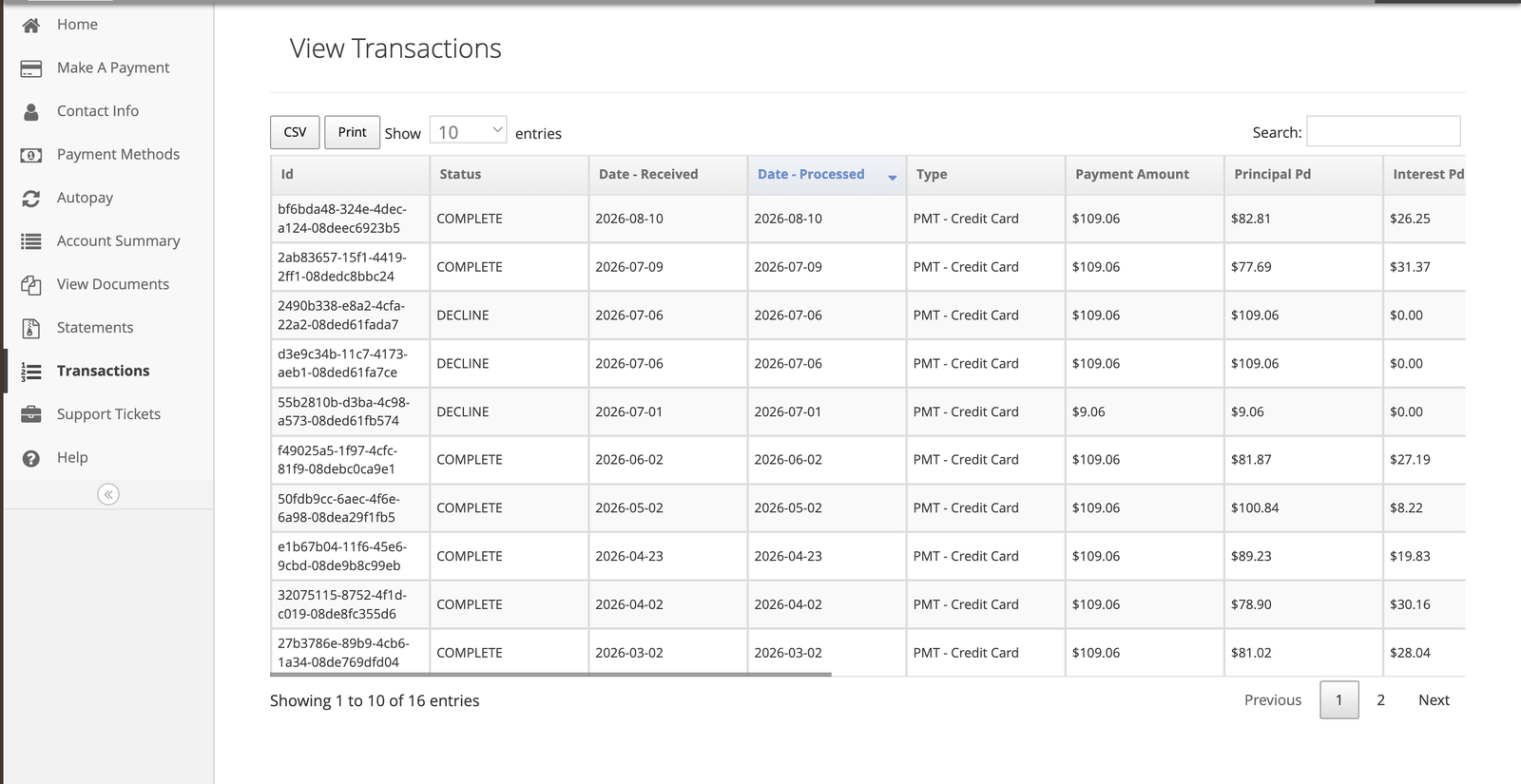
What each column tells you
The three statuses
A declined payment sitting in your history is a record that an attempt was made, not a payment you
have made. If it is still showing as your most recent activity, the payment did not happen.
Why your balance moves less than you paid
Compare Principal Pd against Payment Amount on any row. The difference went to interest. Early in a contract, more of each payment is interest and less is principal. As the balance falls, that shifts, and more of each payment reaches principal. Nothing is wrong — it is how the allocation order works.Interest you paid, and tax forms
You can find the interest you have paid in three places:- Your monthly statement. It shows interest paid year to date.
- Your transaction history. Download the transaction report and add up the interest you paid.
- Account Summary. It shows the total interest you have paid.
If a payment is missing
Payments can take up to 24 hours to appear. If it has been longer:- Check whether it shows as Declined rather than missing
- Check your bank or card statement to see whether it left your account
- If it left your account and is not here, contact us with the date and amount