> ## Documentation Index
> Fetch the complete documentation index at: https://faq.universalaccountservicing.com/llms.txt
> Use this file to discover all available pages before exploring further.
# Your monthly statement
> What each panel on your statement means, and which numbers to read against each other.
Your statement arrives each billing cycle, on paper or by email depending on what you chose. You can
read every statement in uPortal360 under **Statements**, whichever you picked.
**When it arrives.** Your billing cycle closes about 25 days before your due date, and a mailed
statement is posted around **21 days before** it — so allow for post on top of that. Your very
first cycle is much shorter than the rest, which is why the first statement covers only a few
days.
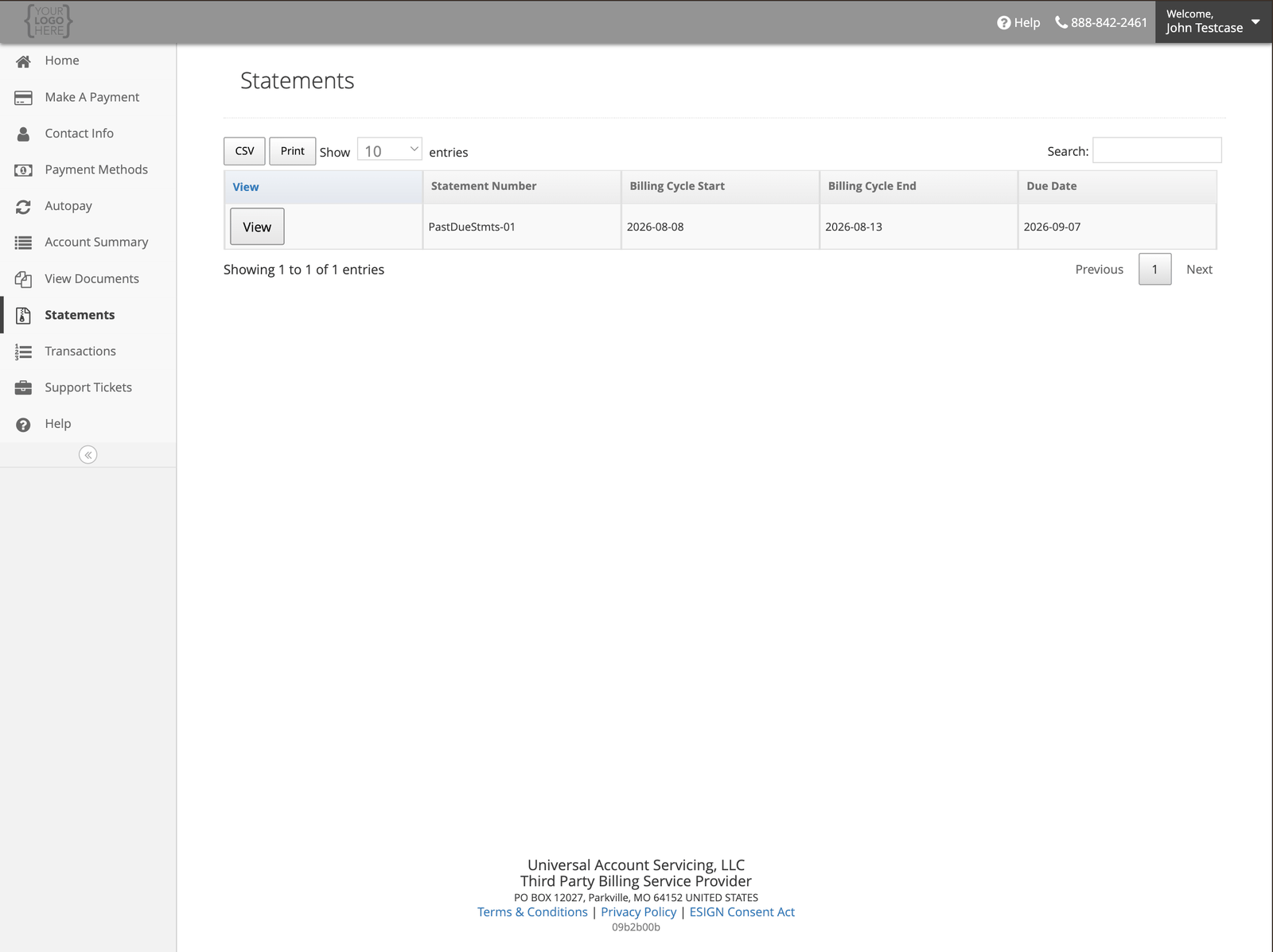 Select **View** to open one in the portal, or use **CSV** and **Print** to export.
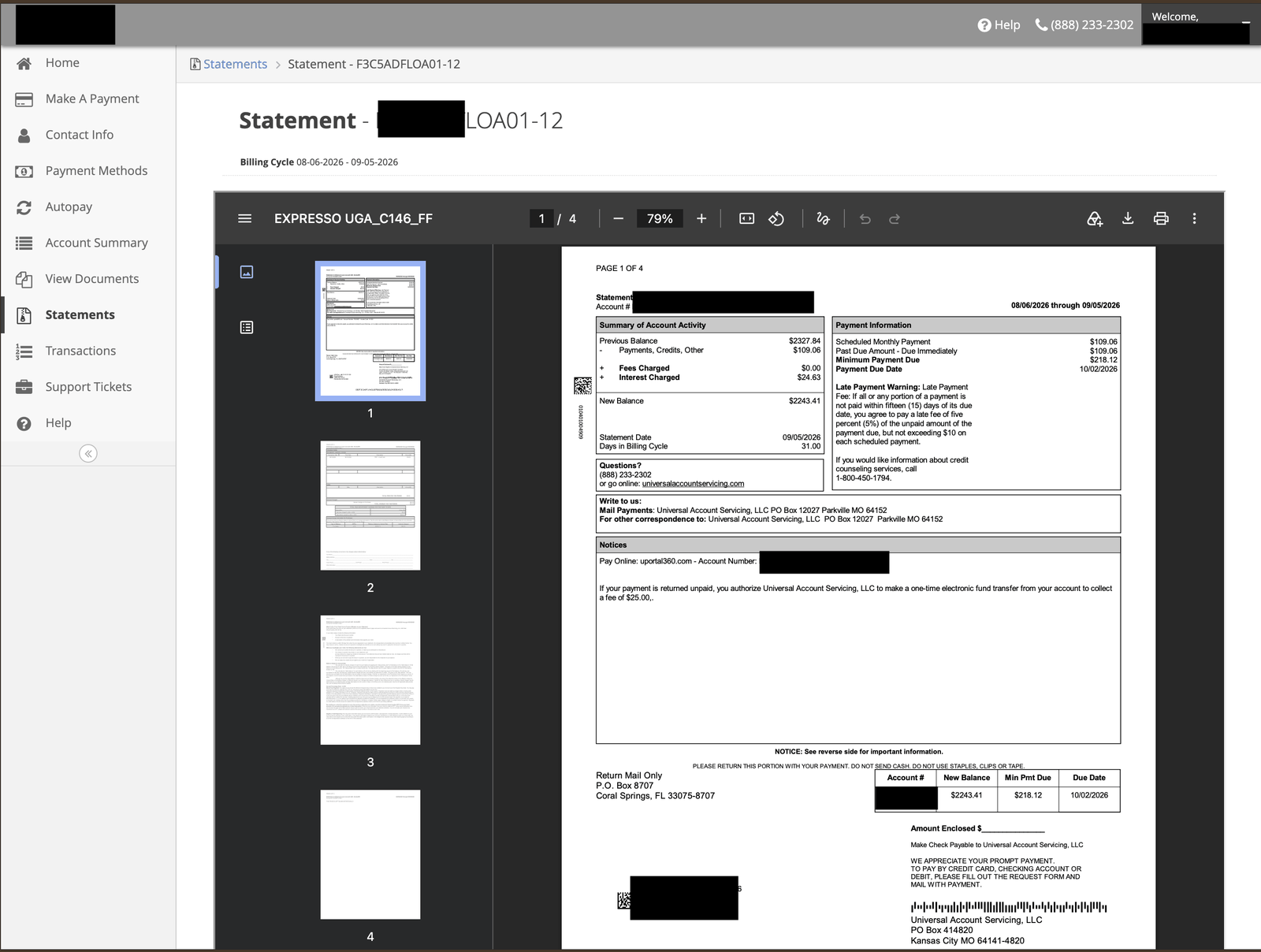
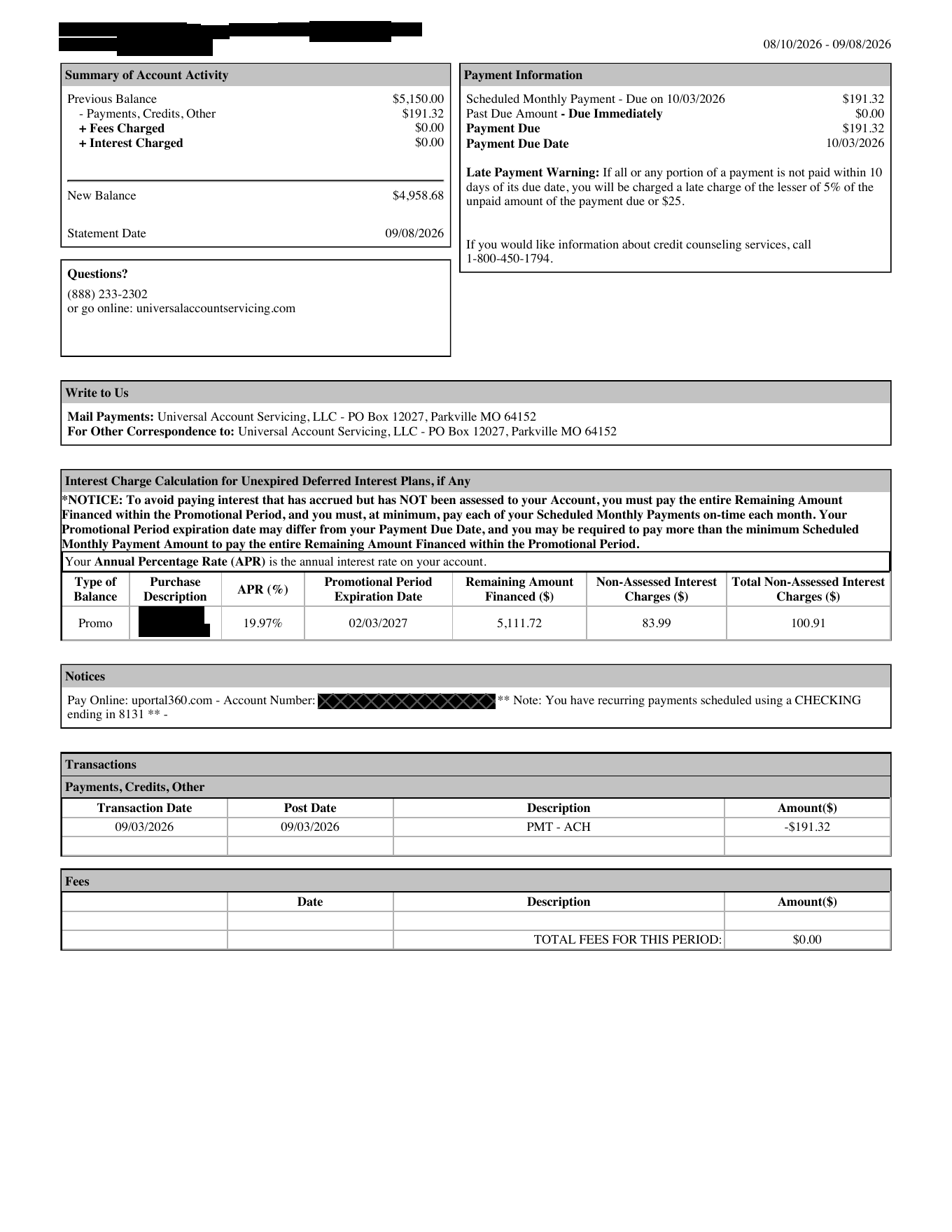 ## Payment Information
The panel to read first. It tells you what to pay and by when.
| Field | What it tells you |
| -------------------------------------------------------- | ---------------------------------------------------------------------------------------------------------- |
| **Scheduled Monthly Payment** or **Min Monthly Payment** | Your regular payment for this cycle |
| **Past Due Amount** | Anything owed from previous cycles, due immediately |
| **Minimum Payment Due** | **The two above, added together.** This is the figure to pay |
| **Payment Due Date** | You have until 11:59 PM Central on this date — see [When your payment posts](/payments/when-payments-post) |
**If you are behind, your Minimum Payment Due is more than your usual payment.** A scheduled
payment of $109.06 with $109.06 past due gives a Minimum Payment Due of \$218.12.
Paying your usual amount will leave you past due.
## Summary of Account Activity
Where your balance moved this cycle.
| Field | What it tells you |
| ------------------------------------------------ | ------------------------------------- |
| **Previous Balance** | Where you started the cycle |
| **Payments, Credits, Other** | What came off |
| **New Purchases** | What was added, on revolving accounts |
| **Fees Charged** | Any fees this cycle |
| **Interest Charged** | Interest this cycle |
| **New Balance** | Where you finished |
| **Statement Date** and **Days in Billing Cycle** | The period this statement covers |
Revolving accounts also show **Credit Limit** and **Credit Available**.
## If you have a promotional offer
There is an extra panel, and it is the most important one on the statement. The column names differ
depending on which kind of offer you have — see
[Finding your promotion details](/promotional-offers#finding-your-promotion-details) for the two
versions side by side.
Read **what you still have to pay** against **the total interest at stake**. The second is what you
owe if you miss the deadline.
## Transactions and Fees
Every payment, credit and adjustment this cycle, and any fees. The full history — going back beyond
this cycle — is under [Transactions](/statements/transaction-history) in the portal.
## Notices
Where your **Account Number** and **Access Code** are printed, along with a note if you have
recurring payments scheduled.
Your statement carries both of your sign-in details. Keep it somewhere sensible and shred it
rather than putting it in the bin — see
[How we protect your information](/trust-and-compliance/how-we-protect-your-data).
## Write to Us
The addresses for mailed payments and for correspondence. If you are mailing a payment, see
[Ways to pay](/payments/ways-to-pay) — and if you are paying from Canada, the address is different.
## The warnings at the bottom
**Late Payment Warning** gives your grace period and late fee. These **vary by program** — some
accounts have ten days, some fifteen, some have no late fee at all. Yours is in your
[agreement](/statements/agreement-details).
**Minimum Payment Warning**, on revolving accounts, is the standard disclosure that paying only the
minimum costs more and takes longer.
Every statement also prints a **credit counseling** referral number, if you would like free help
with debt.
## Going paperless
You can switch to electronic statements, and switch back — see
[Alerts and paperless statements](/signing-in/alerts-and-paperless).
Four things worth knowing about which statements arrive how:
* **If you fall behind, we post you a statement even if you are paperless.** It is a second attempt
to reach you, not a change to your settings — your paperless preference stays as it was.
* **If you are paperless but your email has not been verified yet**, your first statement comes by
post.
* **If you have a fixed-term account on AutoPay**, statements are generated electronically and not
posted to you.
* **If your address is outside the US**, statements are electronic only. We do not post them
internationally.
## When your account closes
Your final statement shows a **\$0.00 balance** once the account is paid in full, or once a return or
cancellation clears it. That last statement is your record that nothing more is owed — keep it.
After the account closes, no further statements are produced for a cycle that ends with nothing
owing. Revolving accounts get a statement every month for as long as they are open, whatever the
balance.
## Payment Information
The panel to read first. It tells you what to pay and by when.
| Field | What it tells you |
| -------------------------------------------------------- | ---------------------------------------------------------------------------------------------------------- |
| **Scheduled Monthly Payment** or **Min Monthly Payment** | Your regular payment for this cycle |
| **Past Due Amount** | Anything owed from previous cycles, due immediately |
| **Minimum Payment Due** | **The two above, added together.** This is the figure to pay |
| **Payment Due Date** | You have until 11:59 PM Central on this date — see [When your payment posts](/payments/when-payments-post) |
**If you are behind, your Minimum Payment Due is more than your usual payment.** A scheduled
payment of $109.06 with $109.06 past due gives a Minimum Payment Due of \$218.12.
Paying your usual amount will leave you past due.
## Summary of Account Activity
Where your balance moved this cycle.
| Field | What it tells you |
| ------------------------------------------------ | ------------------------------------- |
| **Previous Balance** | Where you started the cycle |
| **Payments, Credits, Other** | What came off |
| **New Purchases** | What was added, on revolving accounts |
| **Fees Charged** | Any fees this cycle |
| **Interest Charged** | Interest this cycle |
| **New Balance** | Where you finished |
| **Statement Date** and **Days in Billing Cycle** | The period this statement covers |
Revolving accounts also show **Credit Limit** and **Credit Available**.
## If you have a promotional offer
There is an extra panel, and it is the most important one on the statement. The column names differ
depending on which kind of offer you have — see
[Finding your promotion details](/promotional-offers#finding-your-promotion-details) for the two
versions side by side.
Read **what you still have to pay** against **the total interest at stake**. The second is what you
owe if you miss the deadline.
## Transactions and Fees
Every payment, credit and adjustment this cycle, and any fees. The full history — going back beyond
this cycle — is under [Transactions](/statements/transaction-history) in the portal.
## Notices
Where your **Account Number** and **Access Code** are printed, along with a note if you have
recurring payments scheduled.
Your statement carries both of your sign-in details. Keep it somewhere sensible and shred it
rather than putting it in the bin — see
[How we protect your information](/trust-and-compliance/how-we-protect-your-data).
## Write to Us
The addresses for mailed payments and for correspondence. If you are mailing a payment, see
[Ways to pay](/payments/ways-to-pay) — and if you are paying from Canada, the address is different.
## The warnings at the bottom
**Late Payment Warning** gives your grace period and late fee. These **vary by program** — some
accounts have ten days, some fifteen, some have no late fee at all. Yours is in your
[agreement](/statements/agreement-details).
**Minimum Payment Warning**, on revolving accounts, is the standard disclosure that paying only the
minimum costs more and takes longer.
Every statement also prints a **credit counseling** referral number, if you would like free help
with debt.
## Going paperless
You can switch to electronic statements, and switch back — see
[Alerts and paperless statements](/signing-in/alerts-and-paperless).
Four things worth knowing about which statements arrive how:
* **If you fall behind, we post you a statement even if you are paperless.** It is a second attempt
to reach you, not a change to your settings — your paperless preference stays as it was.
* **If you are paperless but your email has not been verified yet**, your first statement comes by
post.
* **If you have a fixed-term account on AutoPay**, statements are generated electronically and not
posted to you.
* **If your address is outside the US**, statements are electronic only. We do not post them
internationally.
## When your account closes
Your final statement shows a **\$0.00 balance** once the account is paid in full, or once a return or
cancellation clears it. That last statement is your record that nothing more is owed — keep it.
After the account closes, no further statements are produced for a cycle that ends with nothing
owing. Revolving accounts get a statement every month for as long as they are open, whatever the
balance.