> ## Documentation Index
> Fetch the complete documentation index at: https://faq.universalaccountservicing.com/llms.txt
> Use this file to discover all available pages before exploring further.
# Your transaction history
> Every payment and adjustment on your account, what each status means, and how much went to principal.
Sign in and select **Transactions** from the menu. Every payment, credit and adjustment on your
account is listed, newest first.
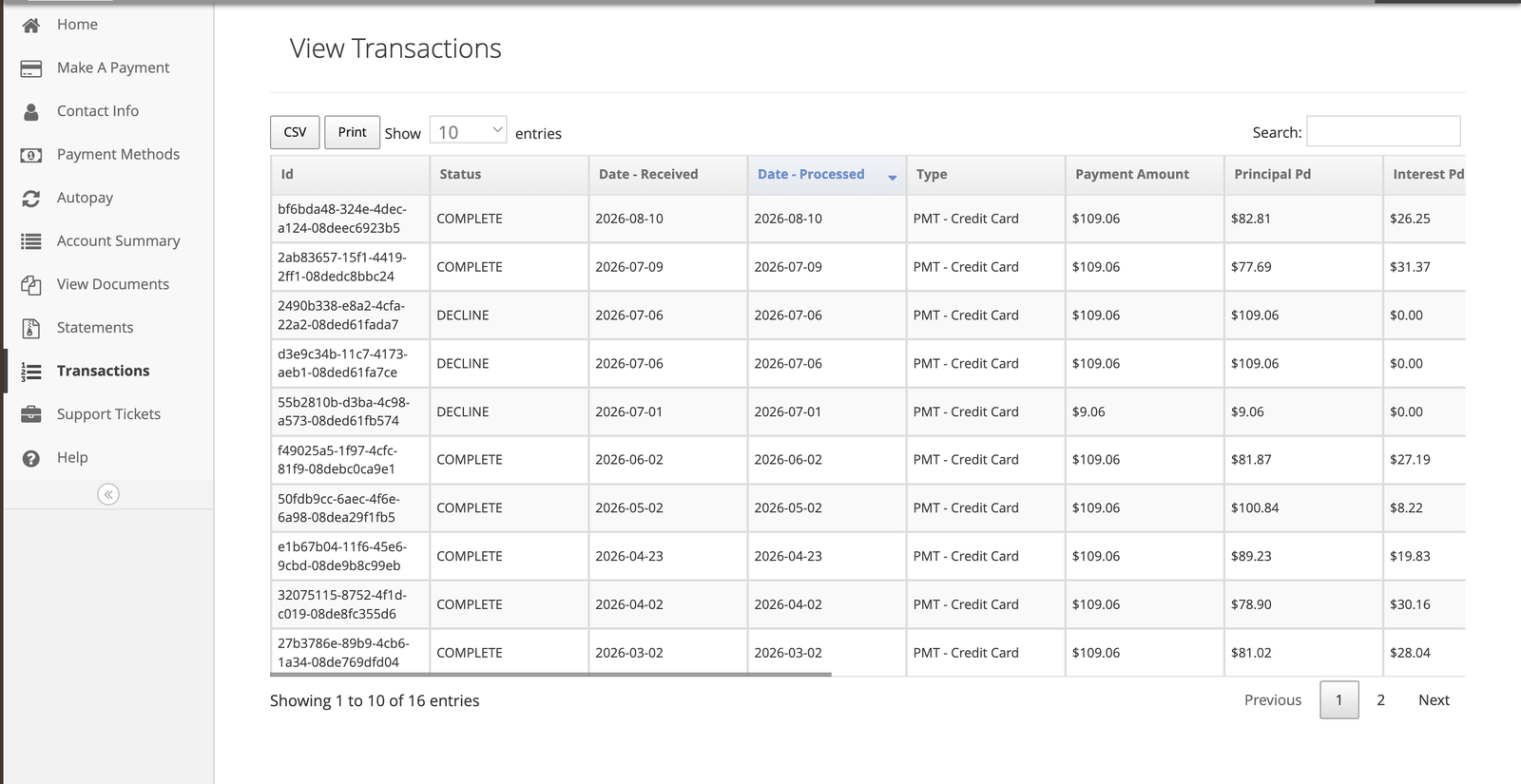 ## What each column tells you
| Column | What it tells you |
| --------------------- | ---------------------------------------------------------------------------------- |
| **Id** | A unique reference for the transaction. Quote it if you contact us about a payment |
| **Status** | Processing, Complete or Declined — see below |
| **Date - Received** | When we received it |
| **Date - Processed** | When we applied it |
| **Type** | Payment, adjustment, fee, and so on |
| **Payment Amount** | The total amount |
| **Principal Pd** | How much reduced what you borrowed |
| **Interest Pd** | How much went to interest |
| **Adjustment Amount** | The total of any adjustment |
## The three statuses
| Status | What it means |
| -------------- | ------------------------------------------------------------------------------------------------------------------- |
| **Processing** | Received, not yet applied to your balance. A payment can take up to 24 hours |
| **Complete** | Applied. Your balance reflects it |
| **Declined** | Not accepted. Nothing was applied — see [When a payment won't go through](/payments/when-a-payment-wont-go-through) |
A declined payment sitting in your history is a record that an attempt was made, not a payment you
have made. If it is still showing as your most recent activity, the payment did not happen.
## Why your balance moves less than you paid
Compare **Principal Pd** against **Payment Amount** on any row. The difference went to interest.
Early in a contract, more of each payment is interest and less is principal. As the balance falls,
that shifts, and more of each payment reaches principal. Nothing is wrong — it is how the
[allocation order](/payments/how-payments-are-applied) works.
## If a payment is missing
Payments can take up to 24 hours to appear. If it has been longer:
* Check whether it shows as **Declined** rather than missing
* Check your bank or card statement to see whether it left your account
* If it left your account and is not here, [contact us](/getting-help/contacting-uas) with the date
and amount
If a payment was credited on a later date than you paid, we can look at re-applying it as of the day
you paid — see [When your payment posts](/payments/when-payments-post).
## What each column tells you
| Column | What it tells you |
| --------------------- | ---------------------------------------------------------------------------------- |
| **Id** | A unique reference for the transaction. Quote it if you contact us about a payment |
| **Status** | Processing, Complete or Declined — see below |
| **Date - Received** | When we received it |
| **Date - Processed** | When we applied it |
| **Type** | Payment, adjustment, fee, and so on |
| **Payment Amount** | The total amount |
| **Principal Pd** | How much reduced what you borrowed |
| **Interest Pd** | How much went to interest |
| **Adjustment Amount** | The total of any adjustment |
## The three statuses
| Status | What it means |
| -------------- | ------------------------------------------------------------------------------------------------------------------- |
| **Processing** | Received, not yet applied to your balance. A payment can take up to 24 hours |
| **Complete** | Applied. Your balance reflects it |
| **Declined** | Not accepted. Nothing was applied — see [When a payment won't go through](/payments/when-a-payment-wont-go-through) |
A declined payment sitting in your history is a record that an attempt was made, not a payment you
have made. If it is still showing as your most recent activity, the payment did not happen.
## Why your balance moves less than you paid
Compare **Principal Pd** against **Payment Amount** on any row. The difference went to interest.
Early in a contract, more of each payment is interest and less is principal. As the balance falls,
that shifts, and more of each payment reaches principal. Nothing is wrong — it is how the
[allocation order](/payments/how-payments-are-applied) works.
## If a payment is missing
Payments can take up to 24 hours to appear. If it has been longer:
* Check whether it shows as **Declined** rather than missing
* Check your bank or card statement to see whether it left your account
* If it left your account and is not here, [contact us](/getting-help/contacting-uas) with the date
and amount
If a payment was credited on a later date than you paid, we can look at re-applying it as of the day
you paid — see [When your payment posts](/payments/when-payments-post).