> ## Documentation Index
> Fetch the complete documentation index at: https://faq.universalaccountservicing.com/llms.txt
> Use this file to discover all available pages before exploring further.
# Payment limits
> How much you can pay in a single transaction, and what to do when your payment is over the limit.
There is a cap on how much you can pay in one transaction. It depends on how you are paying.
## Typical limits
| Paying by | Typical limit per transaction |
| ------------------ | --------------------------------------------------------------------------------------------------- |
| Bank account (ACH) | \$20,000 |
| Debit card | \$20,000 |
| Credit card | \$10,000 |
| HSA card | not available on most accounts — see [Accepted payment methods](/payments/accepted-payment-methods) |
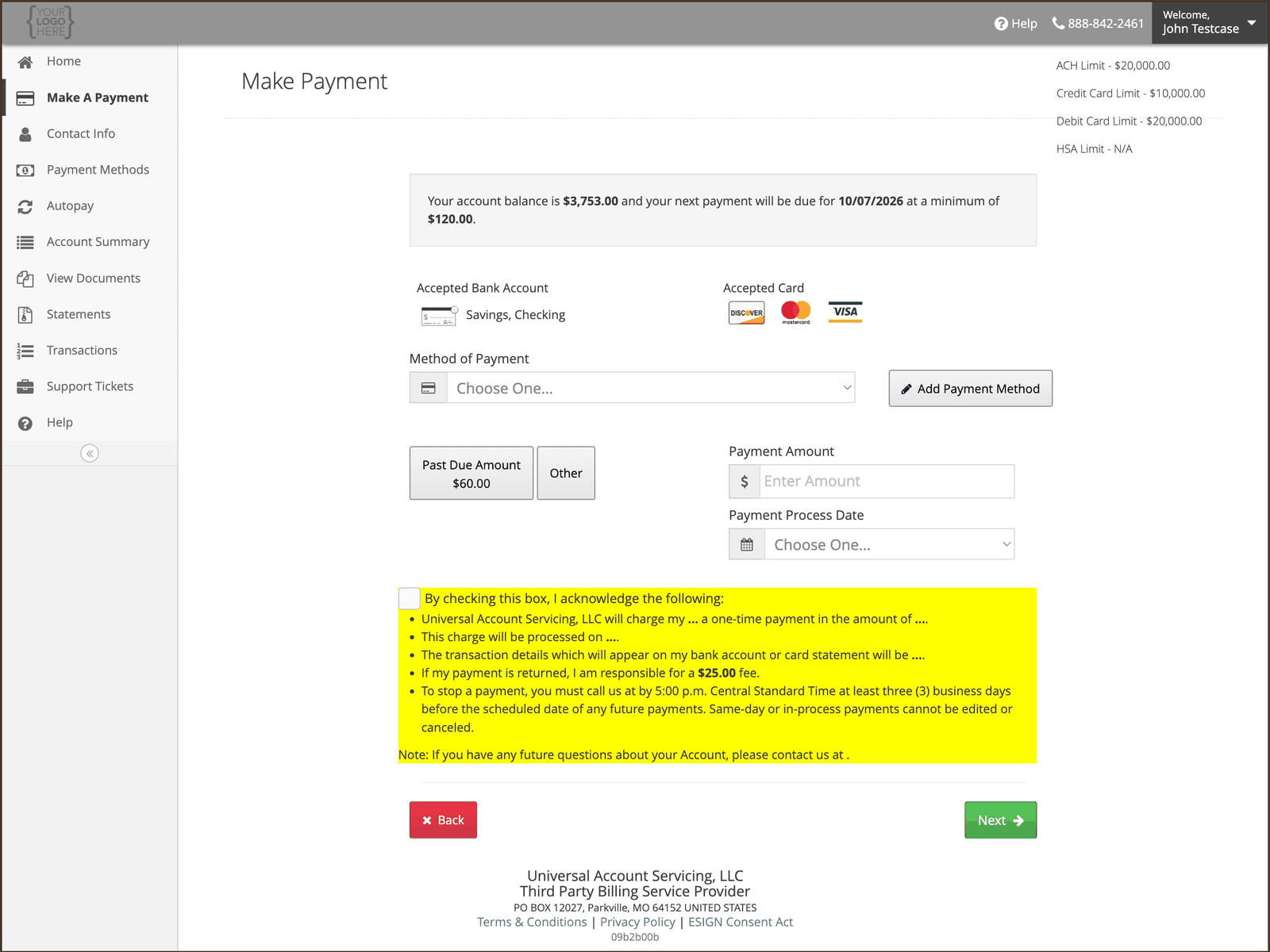
**Your own limits may differ.** These are the usual figures, but both the limits and the methods
themselves are set per finance program. Your actual limits are printed in the top-right corner of
the **Make A Payment** screen in uPortal360 — check there before planning a large payment. A limit
shown as **N/A** means that method is not available on your account at all.
 ## If your payment is over the limit
You will see a **"Payment Amount Exceeds Limit"** message. Nothing has gone wrong with your account
— the amount is above the cap for the method you chose.
Three ways round it:
ACH has double the credit card limit. If you were paying by credit card, switching to a bank
account may be enough on its own.
Make one payment up to the limit, then a second for the remainder. Both will post normally.
If neither works, an agent can take a larger payment over the phone. A customer service fee may
apply when an agent takes the payment — you will be told the amount before it is taken, and you
can choose a free channel instead. See [Ways to pay](/payments/ways-to-pay#by-phone). Splitting
the payment online avoids it.
Have your Account Number to hand.
**If you are racing a promotional deadline, do not leave this to the last day.** A payment that
fails on the limit still has to be redone, and it may not post in time. See
[Promotional offers](/promotional-offers).
## Other payment problems
If the message you are seeing is something other than a limit,
see [When a payment won't go through](/payments/when-a-payment-wont-go-through).
## If your payment is over the limit
You will see a **"Payment Amount Exceeds Limit"** message. Nothing has gone wrong with your account
— the amount is above the cap for the method you chose.
Three ways round it:
ACH has double the credit card limit. If you were paying by credit card, switching to a bank
account may be enough on its own.
Make one payment up to the limit, then a second for the remainder. Both will post normally.
If neither works, an agent can take a larger payment over the phone. A customer service fee may
apply when an agent takes the payment — you will be told the amount before it is taken, and you
can choose a free channel instead. See [Ways to pay](/payments/ways-to-pay#by-phone). Splitting
the payment online avoids it.
Have your Account Number to hand.
**If you are racing a promotional deadline, do not leave this to the last day.** A payment that
fails on the limit still has to be redone, and it may not post in time. See
[Promotional offers](/promotional-offers).
## Other payment problems
If the message you are seeing is something other than a limit,
see [When a payment won't go through](/payments/when-a-payment-wont-go-through).