> ## Documentation Index
> Fetch the complete documentation index at: https://faq.universalaccountservicing.com/llms.txt
> Use this file to discover all available pages before exploring further.
# Asking a question about your bill
> Open a billing request about fees, interest, payment amounts or due dates — and what you can check yourself first.
We answer billing questions ourselves. The seller is not involved, so these are usually faster than
questions about a purchase.
Many answers are already in uPortal360. Check there first. A request is for anything it does not
explain.
## Check these first
| If your question is about | Look here |
| ------------------------------------ | --------------------------------------------------------------------------------------------------------------------------- |
| **Your payoff amount** | **Account Summary** in uPortal360. See [Your agreement and account details](/statements/agreement-details#account-summary). |
| **A fee or an interest charge** | Your monthly statement. See [Your monthly statement](/statements/your-monthly-statement#transactions-and-fees). |
| **When a payment is due** | Your statement's **Payment Information**, or the **Home** screen in uPortal360. |
| **Changing your due date** | [If you are having trouble paying](/getting-help/trouble-making-payments#changing-your-due-date). |
| **Deferred or promotional interest** | Use the [promotional offer request](/getting-help/support-requests/promotional-offer-question) instead. |
## Opening the request
Sign in to uPortal360 and select **Help**, then **Start Inquiry**.
Under **Billing**, find **I Have a Question About My Bill** and select **Select**.
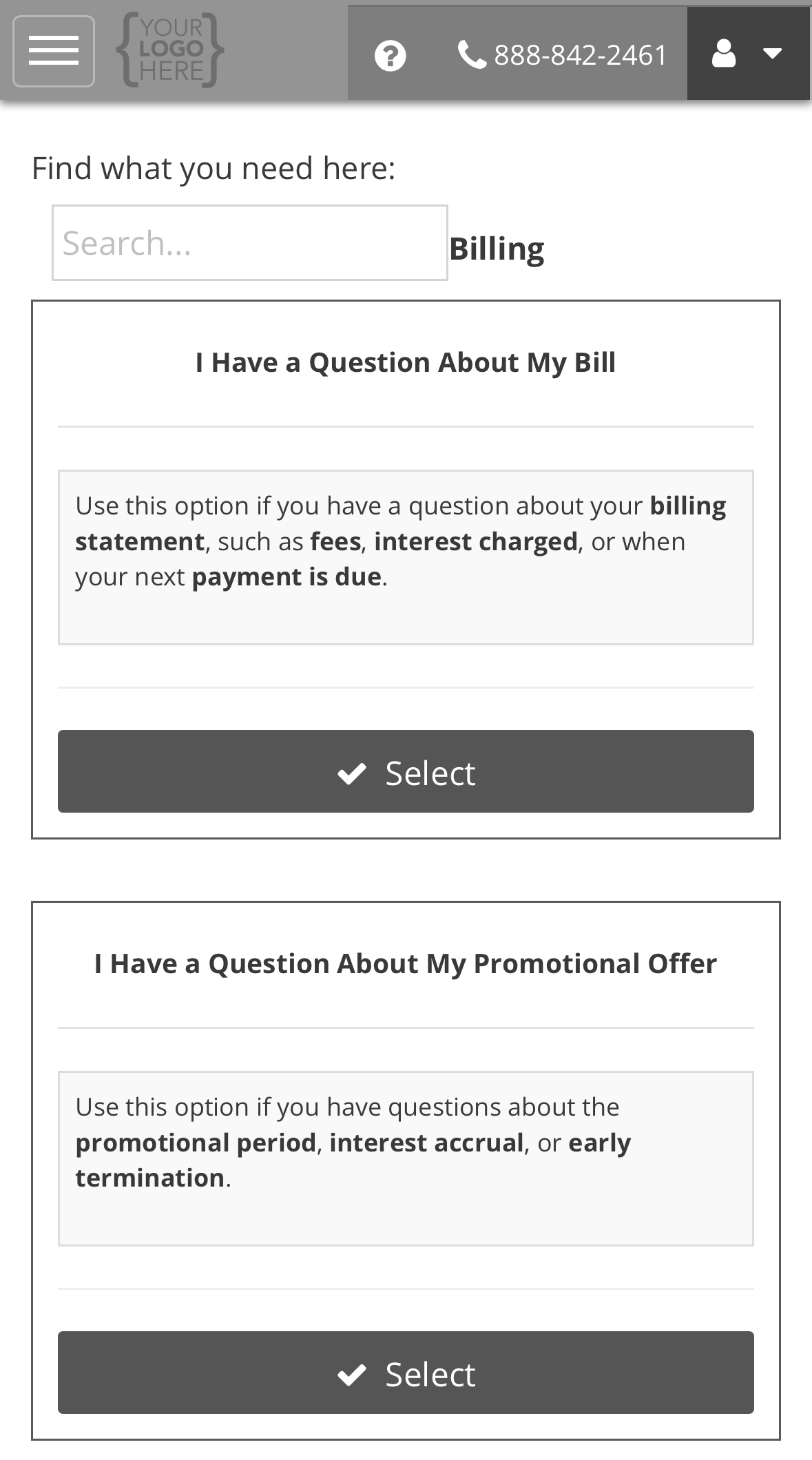 Answer both questions, then select **Submit**. The steps after that, from your case
number to your ticket, are the same for every request type. See the [example on Opening a support request](/getting-help/opening-a-support-request#example-opening-a-request).
## What the form asks, and why
| Question | What to put, and why we ask |
| ---------------------------------------- | ------------------------------------------------------------------------------------------------------------------------------------------------------------------------------------------------------------------------ |
| **What is Your Billing Question About:** | The topic closest to your question: **Fees**, **Interest**, **Payment Amount**, **Past Due Amount**, **Payment Due Date**, **Payoff Amount**, **Account Details** or **Other**. It sends the ticket to the right person. |
| **Additional Details:** | Which statement or charge you mean, with the date and amount, and what you expected instead. If you are asking for a fee to be removed, say which fee and why you think it should not have been charged. |
## What happens next
We acknowledge the request by the next business day. Most are answered within **11 business days**.
You get an email when it is updated. See
[Reading your ticket](/getting-help/opening-a-support-request#reading-your-ticket).
If you think a charge is wrong, not only unclear, see
[Disputing a charge](/getting-help/disputing-a-charge).
Back to support requests.
Answer both questions, then select **Submit**. The steps after that, from your case
number to your ticket, are the same for every request type. See the [example on Opening a support request](/getting-help/opening-a-support-request#example-opening-a-request).
## What the form asks, and why
| Question | What to put, and why we ask |
| ---------------------------------------- | ------------------------------------------------------------------------------------------------------------------------------------------------------------------------------------------------------------------------ |
| **What is Your Billing Question About:** | The topic closest to your question: **Fees**, **Interest**, **Payment Amount**, **Past Due Amount**, **Payment Due Date**, **Payoff Amount**, **Account Details** or **Other**. It sends the ticket to the right person. |
| **Additional Details:** | Which statement or charge you mean, with the date and amount, and what you expected instead. If you are asking for a fee to be removed, say which fee and why you think it should not have been charged. |
## What happens next
We acknowledge the request by the next business day. Most are answered within **11 business days**.
You get an email when it is updated. See
[Reading your ticket](/getting-help/opening-a-support-request#reading-your-ticket).
If you think a charge is wrong, not only unclear, see
[Disputing a charge](/getting-help/disputing-a-charge).
Back to support requests.